
Xero Integrations
Xero Integrations connect your accounting data with payment workflows for creating, printing, emailing, mailing, and managing business payments. FiChecks lets businesses bring Xero bills and payment details into a streamlined workflow for checks, ACH transfers, digital payments, and payment tracking.
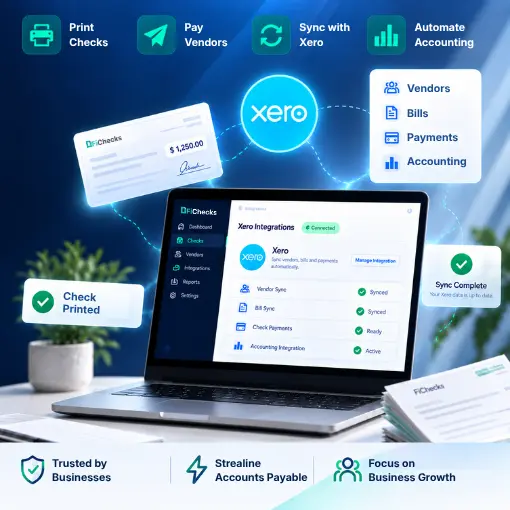
Xero Accounting Integration
Check Printing
ACH Payment Support
Web & Mobile App
WHERE XERO PAYMENT WORKFLOWS GET COMPLEX
Turn Xero Payment Tasks Into a Simpler Workflow
Businesses use Xero to manage invoices, bills, suppliers, and accounting records. But sending payments can still require separate tools, manual data entry, and disconnected processes.
No. 1
Printing checks from Xero
Creating checks outside your accounting workflow can mean re-entering payment information and maintaining separate records.
No. 2
Paying vendors and suppliers
Businesses often need to send payments to multiple vendors while keeping payment details aligned with their Xero records.
No. 3
Managing different payment methods
Checks, ACH transfers, digital checks, and mailed payments may require different processes, making payment management harder to track.
No. 4
Tracking completed payments
When payment activity happens across separate systems, finding payment status, delivery details, and transaction history can take additional time.
HOW FICHECKS WORKS
Connect Xero Payment Data With the Right Payment Workflow
With Xero integrations, businesses can move payment information from Xero into FiChecks and manage the next steps from one place.

Import
Bring eligible payment and bill information from Xero into your FiChecks workflow.

Review
Check payment details, recipients, amounts, and available delivery methods before processing.

Choose
Select the payment method that fits the transaction, including ACH, digital checks, printed checks, or mailed checks.

Send
Process the payment without repeatedly entering the same information across separate systems.

Track
Monitor payment activity, delivery status, and transaction records after processing.
EVERYTHING YOU NEED FOR XERO PAYMENTS
Payment Tools Built Around Your Xero Workflow
FiChecks gives businesses practical tools for handling vendor payments, checks, and electronic transfers while keeping payment activity organized.
Xero Vendor Payments
Import payment details and manage vendor payments through a dedicated payment workflow.
Xero Business Check Printing
Create professional business checks and print them on compatible check stock using your existing printer.
Accounts Payable Automation
Streamline recurring accounts payable tasks by organizing bills, payment details, approvals, and payment processing in one workflow.
Digital Check Payments
Send checks electronically to recipients so they can receive and deposit them without waiting for physical delivery.
Check Mailing Services
Have FiChecks print, package, and mail physical checks to your recipients while keeping delivery activity accessible.
ACH Payments
Send electronic bank transfers for vendor invoices, reimbursements, recurring expenses, and other outgoing transactions.
BUILT FOR EVERYDAY ACCOUNTING WORKFLOWS
Manage Payments Without Changing How You Use Xero
Xero integrations are useful for businesses that already use Xero for accounting but need a more flexible way to handle outgoing payments.
Pay vendors and suppliers from Xero
Print checks using Xero payment information
Send digital checks online
Mail physical checks to recipients
Process ACH payments
Manage invoice and bill payments
Track payment activity and delivery status
Keep payment records organized
Extend Your Xero Accounting Workflow
Businesses often use Xero alongside other tools for accounting, operations, payroll, and vendor management. FiChecks focuses on the payment side, giving teams a dedicated workflow for processing and tracking payments.
Xero payment integration
Xero accounts payable payments
Xero-compatible check printing
Frequently Asked Questions
What are Xero integrations for business payments?
Xero integrations connect Xero accounting information with payment workflows for activities such as vendor payments, check printing, digital checks, mailed checks, and ACH transfers. FiChecks lets businesses use Xero payment data to manage these transactions through a dedicated payment workflow.
Can I print checks from Xero?
Yes. Businesses can use Xero payment information with FiChecks to create and print business checks using compatible check stock and an existing printer. FiChecks also supports online and mailed check options when physical printing is not required.
Can I pay vendors from Xero using ACH or checks?
Yes. FiChecks supports vendor payments using ACH, printed checks, digital checks, and mailed checks. Businesses can use their Xero payment information to manage these payment methods and track transaction activity through FiChecks.
Xero Payment Automation vs Manual Workflows
Manual payment processes can require businesses to copy information from Xero into separate check printing, ACH, or payment tools. This creates more opportunities for duplicate entry and makes payment tracking harder. FiChecks brings payment processing into a structured workflow connected to Xero, allowing businesses to review payment details, select a delivery method, process the transaction, and track its status. This makes Xero payment automation more practical for businesses that regularly manage vendor payments, checks, and electronic transfers.