
QuickBooks Checks
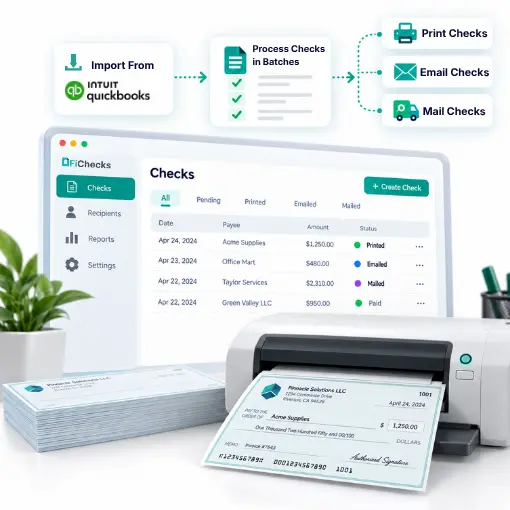
QuickBooks Checks solution to import checks from QuickBooks, then print, email, or mail them without changing their existing accounting workflow. FiChecks gives businesses a simple way to handle check delivery, while keeping payment activity organized and accessible.
Import Checks
Print, Email & Mail
Secure Check Processing
Web & Mobile App
WHERE CHECK WORKFLOWS GET COMPLICATED
Printing and Sending Checks Shouldn’t Require Extra Work
Businesses often create checks in QuickBooks but still need a separate process to print, package, mail, or electronically deliver them. Moving between different tools can create extra steps and make payment tracking harder.
No. 1
Checks are created, but delivery takes time
Creating a check in QuickBooks is only one part of the process. Businesses still need to print it or arrange another way to deliver the payment.
No. 2
Mailing checks adds manual work
Printing checks, preparing envelopes, adding postage, and arranging delivery can take time when handled internally.
No. 3
Recipients may prefer digital delivery
Some recipients prefer receiving checks electronically instead of waiting for physical mail. Managing different delivery methods separately can become inconvenient.
No. 4
Payment records become scattered
Keeping track of checks across different delivery methods can become time-consuming, especially when they are created in one system and sent from another.
HOW FICHECKS WORKS
Create, Send, and Track QuickBooks Checks
Import your checks into FiChecks, select how you want to send them, and keep their status organized in one place. Print checks yourself, email them digitally, or have them mailed directly to the recipient.

Import
Import checks into FiChecks and bring the payment information into one place.

Review
Review the payee, amount, and payment details before choosing a delivery method.

Choose
Select how you want to deliver each check: print, email, or mail.

Send
Print checks using compatible check stock, send them electronically by email, or have FiChecks print and mail them.

Track
Monitor payment activity, delivery status, and transaction history from one centralized location.
EVERYTHING YOU NEED FOR CHECK DELIVERY
One Place to Print, Email, or Mail QuickBooks Checks
FiChecks gives businesses more flexibility after checks are created in QuickBooks, with multiple ways to deliver payments and keep records organized.
QuickBooks Check Import
Import checks into FiChecks instead of manually entering the payment details again.
QuickBooks Check Printing
Print checks using your existing printer and compatible check stock after importing them into FiChecks.
Email Checks
Send checks electronically by email so recipients can view, print, and deposit them without waiting for physical delivery.
Check Mailing Services
Have FiChecks print, package, and mail physical checks on your behalf while maintaining visibility into delivery activity.
Business Checks
Handle vendor payments, payroll checks, reimbursements, and other business payments after importing them.
ACH Payments
Pay vendors, contractors, employees, and other recipients through ACH transfers.
BUILT FOR BUSINESSES THAT USE QUICKBOOKS
Keep QuickBooks for Accounting. Use FiChecks for Check Delivery.
Businesses can continue creating checks in QuickBooks while using FiChecks to manage delivery. Import the checks, select a delivery method, and keep the process moving without entering payment information again.
Import checks
Print business checks on compatible check stock
Email checks to recipients
Mail physical checks through FiChecks
Manage vendor and payroll payments
Track delivery and payment activity
Access payment records when needed
Work With Your Existing QuickBooks Workflow
FiChecks is designed to complement your accounting process rather than replace it. Create checks in QuickBooks, import them into FiChecks, and use the delivery method that fits each payment.
No need to enter check details again
Print, email, or mail payments
Centralized payment tracking and reporting
Frequently Asked Questions
Can I import checks from QuickBooks for printing or mailing?
Yes. FiChecks allows businesses to import checks from QuickBooks and choose how to deliver them. Imported checks can be printed, emailed, or mailed through FiChecks.
Can I print checks created in QuickBooks?
Yes. FiChecks lets businesses import checks created in QuickBooks, review the payment details, and print them using compatible check stock and an existing printer.
Can I email or mail checks created in QuickBooks?
Yes. FiChecks lets businesses import checks from QuickBooks and choose between printing, emailing, or mailing them. This gives businesses flexibility when sending vendor payments, payroll checks, reimbursements, and other business payments.
Quickbooks Checks vs Traditional Check Delivery
Traditional workflows often require businesses to create a check in QuickBooks, then handle printing, envelope preparation, postage, mailing, and delivery tracking separately. FiChecks brings these steps into one workflow. Businesses can import checks from QuickBooks, review them, then print, email, or mail them through FiChecks while keeping payment activity organized in one place.