
Laser Checks For QuickBooks
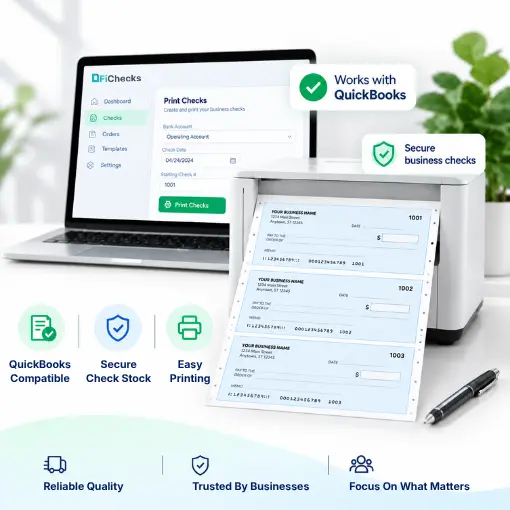
Laser Checks For QuickBooks let businesses create professional checks directly from payment information and print them using a standard office printer. FiChecks supports QuickBooks-compatible checks for businesses that need a practical way to print, email, and manage business checks without changing their existing accounting workflow.
Import Payments
Print Checks
Email Checks
Mail Checks
WHEN CHECK PRINTING BECOMES A CHORE
Printing Business Checks Should Not Slow Down Payments
Businesses still rely on checks for vendors, employees, contractors, rent, refunds, and other payments. The process becomes time-consuming when check details must be entered manually or checks have to be prepared one at a time.
No. 1
Manual check preparation
Entering payee details and payment amounts repeatedly increases the time needed to prepare routine checks.
No. 2
Finding the right check format
Different businesses use different layouts, including 3-per-page checks, voucher checks, and wallet checks. Using the right format matters for accurate printing.
No. 3
Printing and sending checks
Printing, saving, emailing, or mailing checks through separate processes can make payment tasks harder to track.
No. 4
Keeping payment records organized
Businesses need clear records of what was printed, who received it, and when the payment was processed.
HOW FICHECKS WORKS
Print Checks From Your Existing Payment Workflow
Laser checks for QuickBooks give businesses a straightforward way to prepare and print checks while keeping payment information organized.

Import
Bring payment information into your workflow and prepare the details needed for each check.

Review
Check the payee, amount, date, and payment details before printing.

Print professional business checks using your existing printer and compatible blank check stock.

Send
Email a printable check or use check mailing services when a physical check needs to reach the recipient.

Track
Keep payment records accessible so your team can review previous transactions when needed.
BUILT FOR EVERYDAY BUSINESS PAYMENTS
Flexible Check Printing for Different Payment Needs
Businesses can use QuickBooks laser checks for routine payments without adding unnecessary steps to their accounting process.
QuickBooks Business Checks
Prepare professional checks for vendors, contractors, employees, rent, refunds, and other business expenses.
3-Per-Page Checks
Print 3 checks per page when you need an efficient format for regular business payments.
QuickBooks Voucher Checks
Use voucher-style layouts when additional payment details need to appear alongside the check.
Laser Business Checks
Print business checks on compatible blank stock using a standard laser printer.
Printable Business Checks
Create printable checks that can be saved or shared electronically when physical delivery is not required.
Check Mailing Services
Have FiChecks print, package, and mail checks when you prefer not to handle physical delivery yourself.
WORKS WITH YOUR EXISTING PAYMENT PROCESS
Business Check Printing Without Unnecessary Changes
Businesses already use accounting software to manage invoices, expenses, payroll, and payment records. FiChecks fit into that workflow by giving teams a practical way to prepare and print checks without relying on handwritten forms.
Print checks using compatible blank stock
Use your existing office printer
Prepare payments for vendors and other recipients
Email printable checks when appropriate
Use check mailing services for physical delivery
Keep payment activity organized in one place
Flexible Check Printing for Everyday Payments
Laser checks for QuickBooks give businesses a simple way to prepare and print checks for regular payments. FiChecks supports different check formats and delivery options for businesses that need flexibility in how they handle payments.
Print on Blank Check Stock
Supports 3 Checks Per Page
QuickBooks Voucher Checks
Frequently Asked Questions
What are laser checks for QuickBooks?
Laser checks for QuickBooks are business checks designed to be printed using a laser printer from payment information managed through QuickBooks or a compatible workflow. FiChecks lets businesses prepare and print checks on compatible blank stock and manage delivery options.
Can I print QuickBooks-compatible checks with a regular printer?
Yes. FiChecks supports business check printing with a standard office printer and compatible check stock. Businesses can prepare checks, review the payment details, and print them without using a dedicated check-printing machine.
What types of checks can I print for QuickBooks?
Businesses can use FiChecks for several business check formats, including 3-per-page checks and voucher-style checks, depending on their payment and printing requirements. FiChecks also supports printable checks and check mailing services for different delivery needs.
Laser Checks For QuickBooks vs Manual Check Printing
Manual check printing often requires entering payment details, preparing checks, handling printing, and arranging delivery as separate steps. Laser checks for QuickBooks streamline the process by letting businesses prepare printable checks from digital payment information. FiChecks also supports check printing, email delivery, and mailing services, giving businesses more options for handling payments.