
QuickBooks Credit Card Processing
QuickBooks Credit Card Processing lets businesses accept card payments from customers and manage those transactions alongside their QuickBooks accounting records. FiChecks connects payment collection with everyday accounting workflows, making it easier to accept customer payments, process invoices, track transactions, and keep payment records organized.
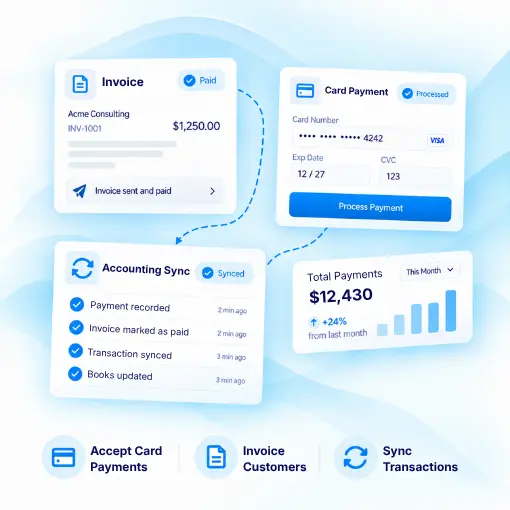
Credit Card Payments
Online Invoice Payments
QuickBooks Integration
Payment Tracking
WHERE CUSTOMER PAYMENTS SLOW THINGS DOWN
Managing QuickBooks Payments Shouldn’t Require Extra Work
Businesses accept customer payments every day, but keeping card transactions, invoices, payment records, and accounting data aligned can take time. Separate payment tools can also make reconciliation more difficult.
No. 1
Unpaid invoices and delayed collections
Customers want convenient ways to pay invoices. Giving them a secure online card payment option can make it easier to collect outstanding balances.
No. 2
Payment records in different places
When payment activity and accounting records are managed separately, finance teams may spend extra time checking transactions and updating records.
No. 3
Manual payment reconciliation
Matching customer payments with invoices and accounting entries can become repetitive when transaction information does not flow into the right records.
No. 4
Multiple payment workflows
Businesses may use separate tools for invoices, card payments, transaction tracking, and accounting, creating unnecessary steps for finance teams.
HOW FICHECKS WORKS
Connect Customer Payments With Your QuickBooks Workflow
FiChecks gives businesses a practical way to manage customer card payments while keeping QuickBooks accounting workflows organized.

Collect
Accept credit card payments from customers through convenient online payment options.

Process
Process customer payments securely and connect each transaction with the relevant payment or invoice details.

Sync
Keep payment information aligned with QuickBooks records to reduce manual data entry.

Reconcile
Review transactions and payment records to make it easier to match customer payments with accounting activity.

Track
Monitor payment activity, customer transactions, and payment history from one place.
EVERYTHING BUSINESSES NEED
A Complete QuickBooks Payment Processing Solution
Designed for businesses that want to accept card payments while keeping customer payment activity connected to their accounting workflow.
Credit Card Invoice Payments
Let customers pay invoices online using credit cards and provide a convenient way to settle outstanding balances.
QuickBooks Online Payments
Give customers a simple way to make online payments while keeping payment activity organized with your accounting records.
Customer Payment Processing
Process customer payments and maintain clear transaction records for your finance and accounting teams.
QuickBooks Card Transactions
Keep card payment activity organized so teams can review customer transactions and payment history more efficiently.
Payment Reconciliation
Match incoming customer payments with invoices and accounting records to reduce manual reconciliation work.
Transaction Tracking
Review payment status, transaction details, and customer payment activity without relying on disconnected records.
BUILT FOR EVERYDAY BUSINESS PAYMENTS
Accept Customer Payments Without Disrupting Your Accounting Workflow
QuickBooks credit card processing can support businesses that collect customer payments for products, services, invoices, subscriptions, and other business transactions.
Accept credit card payments from customers
Collect payments against outstanding invoices
Process online invoice payments
Track customer payment activity
Review card transaction details
Reconcile payments with accounting records
Manage electronic business payments
Keep payment information organized
A Practical Way to Manage QuickBooks Payments
Businesses already use QuickBooks to manage invoices, accounting, customer records, and financial activity. FiChecks adds a payment workflow that can work alongside those processes instead of forcing teams to manage customer payments separately.
Online payment collection
Connected payment records
Less manual reconciliation
Frequently Asked Questions
What is QuickBooks credit card processing?
QuickBooks credit card processing allows businesses to accept credit card payments from customers and manage those transactions alongside QuickBooks accounting records. FiChecks provides tools for collecting customer payments, processing card transactions, and keeping payment activity organized.
How can I accept credit card payments for QuickBooks invoices?
Businesses can use FiChecks to accept credit card payments for customer invoices and online payment requests. Payment activity can then be managed alongside QuickBooks records, making it easier to track customer payments and outstanding balances.
Can QuickBooks credit card payments be reconciled with accounting records?
Yes. FiChecks helps businesses organize card payment activity so customer payments can be reviewed against invoices and accounting records. This can make QuickBooks payment reconciliation easier and reduce the need for manual transaction tracking.
QuickBooks Credit Card Processing vs Manual Payment Management
Managing card payments separately from QuickBooks can create extra work when tracking invoices, matching transactions, and updating payment records. FiChecks connects customer payment activity with the accounting workflow, helping businesses manage card payments and reconciliation more efficiently.