
Xero Accounts Payable
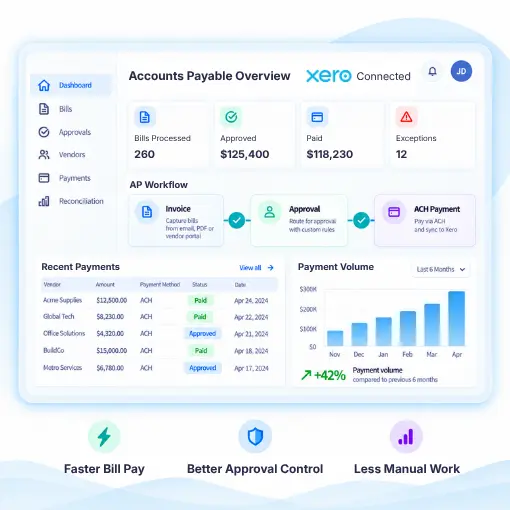
Xero Accounts Payable integration to manage bills, approve payments, pay vendors, and track outgoing transactions. FiChecks adds flexible payment options such as ACH, checks, and digital payments, so teams can move from approved invoices to completed payments without switching between multiple payment tools.
AP Automation
Bill Payments
Payment Reconciliation
Web & Mobile App
WHERE ACCOUNTS PAYABLE GETS SLOW
Paying Bills Through Xero Should Not Mean More Manual Work
Accounts payable teams deal with invoices, approvals, payment details, vendor records, and transaction tracking every day. When payment processing happens separately from Xero, routine tasks can take more time and create extra reconciliation work.
No. 1
Manual bill payments
Approved bills still need to be paid, which can mean entering payment details and processing transactions separately.
No. 2
Vendor payment management
Paying multiple suppliers requires accurate payment details, consistent processes, and clear records for every transaction.
No. 3
Disconnected payment tracking
When bills and payments are handled in different systems, teams may spend extra time checking which invoices have been paid and which are still pending.
No. 4
Reconciliation work
Matching outgoing payments with bills and transaction records can become difficult when payment activity is spread across different tools.
HOW FICHECKS WORKS
Turn Approved Xero Bills Into Completed Payments
FiChecks connects the accounts payable process with flexible payment methods, allowing businesses to manage payment activity while keeping Xero at the center of their accounting workflow.

Connect
Connect your Xero account and bring your accounts payable workflow into a payment environment built for business transactions.

Review
Review bills, payment details, recipients, and available payment methods before sending funds.

Approve
Apply internal approval controls and user permissions before payments are processed.

Pay
Send payments through ACH, checks, digital checks, or other available payment methods based on your business needs.

Track
Monitor payment status, transaction history, and payment records from one place.
EVERYTHING YOU NEED TO PAY BILLS
A Practical Xero Accounts Payable Payment Solution
Manage outgoing payments without adding unnecessary steps to your existing accounting process.
Xero Bill Payment Automation
Move from approved bills to payment processing with fewer manual steps.
ACH Payments
Send electronic payments to vendors, suppliers, and other business recipients.
Digital Check Payments
Send digital checks electronically without printing or mailing.
Check Printing
Create and print business checks using your existing printer and compatible check stock.
Check Mailing Services
Have FiChecks print, package, and mail checks while keeping payment activity visible.
Payment Tracking
Track payment activity and transaction records to maintain clear accounts payable records.
BUILT FOR EVERYDAY BUSINESS PAYMENTS
Pay Vendors Without Changing Your Accounting Workflow
Xero accounts payable can support payment workflows across different types of businesses, from small companies to growing teams managing frequent vendor payments.
Pay suppliers and vendors after invoice approval
Send ACH payments for accounts payable
Create and print checks for business expenses
Send digital checks electronically
Schedule recurring payments when needed
Track outgoing payment activity
Keep payment records available for reconciliation
Connect Accounting With Business Bill Payments
Businesses already use Xero to manage bills, invoices, expenses, and financial records. FiChecks focuses on the payment side, giving teams practical ways to turn approved bills into completed vendor payments.
Xero payment integration
Multiple payment methods
Centralized payment records
Frequently Asked Questions
What is Xero accounts payable?
Xero accounts payable refers to using Xero to manage money a business owes to vendors and suppliers, including bills, invoices, and payment records. FiChecks extends this workflow by providing payment options for sending funds after bills are approved.
How can I pay vendors from Xero?
You can use Xero to manage bills and use FiChecks to process payments to vendors through available methods such as ACH, digital checks, printed checks, and mailed checks. This supports a connected Xero accounts payable workflow without requiring separate manual payment processes for every transaction.
Can I automate vendor payments in Xero?
FiChecks supports Xero accounts payable automation by connecting approved bills with business payment workflows. Businesses can use ACH payments, checks, digital checks, and recurring payment options to reduce repetitive payment tasks and maintain payment records.
Xero Accounts Payable Automation vs Manual Bill Payments
Manual bill payment often requires teams to review bills in Xero, enter payment details into another system, process the transaction, and then check payment records for reconciliation. Xero accounts payable automation brings these steps closer together by connecting accounting information with payment processing. FiChecks supports this approach with ACH, checks, digital checks, payment tracking, and reconciliation records, giving businesses a more organized path from invoice approval to vendor payment.