
Zapier Integrations
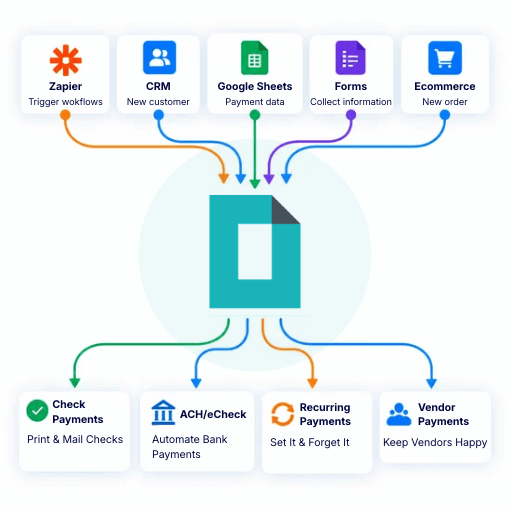
Zapier Integrations connect everyday business apps with FiChecks to reduce manual work in payment operations. Businesses can use automated workflows to trigger check creation, initiate supported payment processes, organize payment records, and send notifications when specific actions occur. FiChecks brings check printing, digital checks, ACH transfers, and check mailing into these workflows, helping teams manage payments with fewer repetitive tasks.
Connect Business Apps
Automate Payment Workflows
Simplify Payment Tracking
Manage Checks and ACH
WHERE MANUAL WORK SLOWS YOU DOWN
Repetitive Payment Tasks Take Time Away From Important Work
Businesses often use separate applications for accounting, sales, vendor management, and payment operations. Moving information between these tools, preparing checks, and updating records manually can lead to delays and missed steps.
No. 1
Manual payment preparation
Teams spend valuable time transferring payment details between applications, preparing checks, and entering the same information more than once.
No. 2
Delayed vendor payments
Without a connected workflow, approved bills and payment requests can sit waiting for someone to process them manually.
No. 3
Scattered payment updates
When payment activity happens across different applications, teams may struggle to find the latest status or keep everyone informed.
No. 4
Time-consuming reconciliation
Finance teams often need to compare accounting records with payment activity manually, making it harder to identify missing or mismatched entries.
HOW ZAPIER INTEGRATIONS WORK
Connect Your Apps and Automate Payment Tasks
FiChecks works alongside your existing software to support automated payment workflows. Using Zapier, you can connect supported applications and configure actions based on specific triggers, approvals, or business events.

Connect
Choose the applications you want to connect and configure the relevant triggers and actions in Zapier.

Trigger
Start a workflow when an event occurs, such as a new record, an approved request, or an updated invoice.

Process
Pass the required information into your configured workflow to support check creation or other available payment actions.

Notify
Send updates to the relevant people when a workflow reaches a defined step or a payment status changes.

Track
Keep payment records accessible and coordinate follow-up tasks across your connected applications.
EVERYTHING YOUR WORKFLOWS NEED
Payment Automation That Fits Your Existing Tools
Use Zapier integrations to connect business processes with payment tasks, reducing repetitive data entry and making routine operations easier to manage.
Zapier Payment Workflow Automation
Connect supported apps to trigger payment-related tasks when records are created, requests are approved, or other defined events occur.
Zapier eCheck Integration
Include digital check workflows in your connected processes to reduce the need to prepare and deliver every check manually.
Zapier ACH Payment Automation
Connect eligible payment workflows with supported ACH processes to manage electronic transfers for vendors, contractors, and other recipients.
Zapier Check Printing Automation
Reduce repetitive check preparation by connecting relevant business records to configured check creation and printing workflows.
Zapier Check Mailing Automation
Include check mailing in your payment process so physical checks can be prepared and mailed through FiChecks where supported.
Zapier Accounts Payable Automation
Connect vendor records, payment requests, and approval steps to reduce manual follow-ups and keep accounts payable workflows organized.
BUILT AROUND YOUR EVERYDAY BUSINESS PROCESSES
Automate More Than Just Payment Preparation
FiChecks supports payment workflows for businesses that need to coordinate finance activities with other applications.
Trigger payment-related tasks from new or updated business records
Connect vendor information with check and ACH workflows
Reduce repeated entry of payment details across applications
Coordinate check printing and mailing tasks
Send payment notifications and alerts to relevant team members
Support recurring payment workflows where the required setup is available
Keep payment activity organized for reporting and reconciliation
Make Your Apps Work Together Without Changing Your Entire Setup
Businesses already rely on accounting platforms, CRM systems, spreadsheets, project management tools, and other applications to manage daily operations. Zapier connects supported apps through configured triggers and actions, while FiChecks provides payment and check management capabilities.
Instead of rebuilding your existing processes, you can create workflows that connect the tools your team already uses with relevant payment tasks.
Connect supported third-party applications through Zapier
Reduce manual data entry and repetitive follow-ups
Coordinate payment preparation with existing workflows
Frequently Asked Questions
What are Zapier integrations, and how do they work?
Zapier integrations connect different applications so actions in one app can trigger tasks in another. FiChecks can be incorporated into supported workflows to coordinate check creation, payment-related tasks, and notifications, depending on the available integration methods and configuration.
Can I automate business payments using Zapier?
Yes. Businesses can configure workflows to connect payment requests, vendor records, approvals, and other business events with supported payment processes. FiChecks provides check printing, digital check, ACH, and check mailing capabilities that can be incorporated where the required integration and actions are supported.
Can Zapier connect accounting software with check printing and mailing services?
Zapier can connect supported accounting applications with other services through configured triggers and actions. FiChecks supports business check printing and mailing, allowing businesses to build connected workflows where the necessary integration is available. The exact level of automation depends on the applications, triggers, and actions supported by the setup.
Zapier Payment Automation vs Traditional Workflows
Traditional payment workflows often require teams to copy information between accounting software, vendor records, approval tools, and payment applications. Staff may also need to prepare checks, arrange mailing, update records, and notify colleagues separately. With Zapier integrations with FiChecks, businesses can connect supported applications and configure workflows that reduce repetitive steps. This approach can streamline payment preparation, improve coordination, and keep related records more organized without requiring businesses to replace their existing software.