
Running out of checks right when bills are due is a major hassle. Ordering a fresh box from the bank takes days, and handwriting checks takes too long and looks sloppy. Getting started with designing checks online solves both problems by letting you generate clean, ready-to-deposit payments right from your own computer on your own schedule.
Setting up and printing your own checks online fixes both problems. You get clean, professional-looking checks on your own schedule, straight from your desk.
What Does Designing Checks Actually Mean?
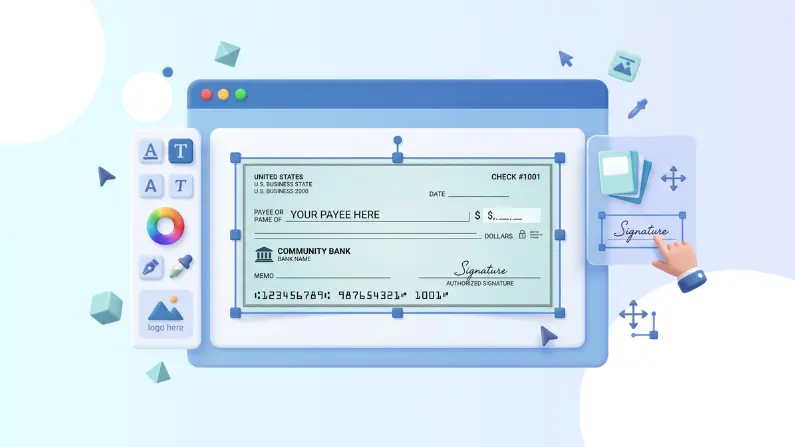
It isn’t just about putting your logo on a piece of paper. It means laying out every mandatory banking detail so tellers and scanning apps can read the check without getting confused.
When you set up a check, you need to place a few key details in the right spots:
- Payer and business details
- Payee name
- Dollar amount (both in numbers and written out)
- Issue date
- Memo line for reference notes
- Authorized signature space
- Check number, routing number, account number, and the bottom MICR line
If any of these numbers get cut off or land in the wrong spot, the bank will kick the check back.
How It Works in Practice
The setup is pretty straightforward:
- Pick your format: Choose whether you want a check at the top with pay stubs below, a check in the middle, or three checks on a single sheet.
- Connect your account: Just enter your business name, address, and your bank routing and account numbers to get everything linked up.
- Fill out the payment: Type in who gets the money, the exact amount, the date, and whatever notes you need in the memo field.
- Preview on screen: Double-check the numbers on screen so you do not waste blank stock.
- Print: Run it through your regular laser or inkjet printer.
You don’t need a specialty machine. Blank check paper from an office supply store and a standard office printer get the job done.
The Core Parts of a Valid Check
Every line on a check does a specific job:
- Payer & Payee: Shows whose account loses money and who gets to cash it.
- Amount & Date: How much money is moving and when the other person can deposit it.
- Check Number: Think of this as your receipt number to see if your payee actually cashed it.
- Routing & Account Numbers: Points the bank right to your checking account so the funds move without a hitch.
- MICR Line: That funky-looking font along the very bottom. Bank sorting machines read this magnetically or optically to push funds through the clearinghouse.
Why Switch to Designing Checks Digitally?
If you write more than a couple of checks a month, doing it manually gets old fast. Moving to a digital tool helps in a few real ways:
- No waiting on bank orders: Print a check the second you need one.
- No bad handwriting: Eliminate errors from sloppy penmanship or smudged ink.
- Work from anywhere: You can prep payments whether you are at the office, working from home, or on the road.
- Tighter bookkeeping: Since you type the information into a computer first, matching your bank statement at the end of the month takes half the time.

Where People Use Them Most
Small business owners lean on digital check tools to cover rent, pay subcontractors, buy equipment, and handle supplier invoices.
Mid-sized shops use them for one-off payroll runs, bonuses, or issuing customer refunds. Even individuals use them for things like security deposits or contractor work when digital transfer apps hit daily transfer limits.
Digital Layouts vs. Old-Fashioned Paper Checkbooks
Handwritten checks are slow, leave zero automatic digital trail, and leave room for human error. If someone misreads your handwriting, the payment gets delayed, or worse, cashed for the wrong amount.
Printing checks directly from software keeps every line crisp, standard, and easy to read. It gives your business a polished look and cuts down on basic clerical mistakes.
Things to Keep in Mind
Watch your printer alignment. If your printer grabs the paper sideways, your MICR line might shift up and fail to scan at the bank counter. Do a test print on plain paper first and hold it against a real check to verify your margins.
Also, stay on top of your numbering sequence. Jumping numbers or using duplicate numbers will make your accountant’s job miserable during tax season.
Keeping Your Banking Details Safe
Checks contain all the data anyone needs to attempt a fraudulent pull on your account.
Keep your blank check paper locked up. If you have employees prepping bills, set up an approval rule so one person drafts the check and another signs off on it. Check your bank account every couple of days to make sure cleared checks match your actual records.
Setting Up Your Checks with FiChecks
FiChecks makes this whole process painless. You log in, key in your payment and account details, preview the layout, and hit print on blank stock.
If you don’t feel like printing checks yourself, FiChecks can handle the distribution too. You can email a secure check directly to the recipient, or let FiChecks print, seal, and mail a physical check through USPS or FedEx on your behalf.
The platform also handles ACH transfers, wires, cards, and digital wallet options. You can take care of all your vendor bills in one place instead of jumping between four different apps and a checkbook.

Wrapping Up
Building checks online gives you full control over when and how you send out funds. You save time, avoid handwriting errors, and keep your books organized without waiting on pre-printed orders.
A lot of us still rely on checks to keep money moving, but nobody enjoys the manual legwork that comes with them. FiChecks lets you create, print, mail, and track checks straight from your screen, so you can handle traditional payments without slowing down your day.