
FreshBooks Integration
FreshBooks integration allows businesses to manage vendor payments, print checks, send ACH transfers, and handle payment tasks through FiChecks. Businesses can create and send payments using different methods while keeping transaction records organized. Continue using FreshBooks for accounting while FiChecks supports check printing, digital checks, ACH, and check mailing.
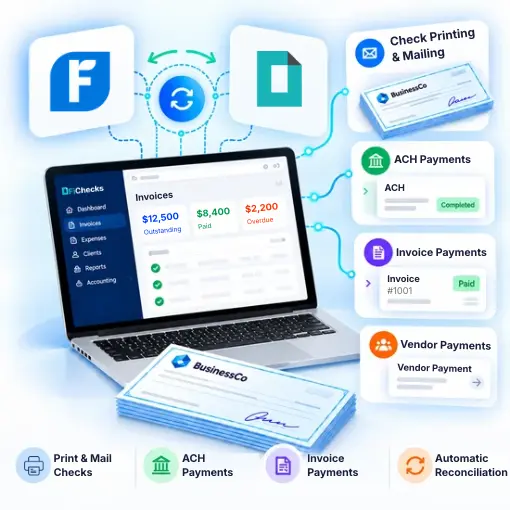
Secure Payment Processing
Vendor Payment Management
Check Printing & Mailing
ACH & Digital Payments
WHERE ACCOUNTING WORKFLOWS FALL SHORT
Managing Payments Outside Your Accounting Software Creates Extra Work
FreshBooks helps businesses manage invoices, expenses, and financial records. However, paying vendors, preparing checks, and tracking outgoing payments can still require additional steps. FiChecks gives teams more flexibility to handle these tasks without changing their existing accounting setup.
No. 1
Manual vendor payments
Preparing individual payments takes time, especially when a business works with multiple vendors, contractors, and suppliers.
No. 2
Time-consuming check preparation
Writing checks manually or preparing them through separate tools adds extra work to routine accounts payable tasks.
No. 3
Scattered payment records
When payment details are stored across different systems, finding transaction information and matching payments to accounting records becomes harder.
No. 4
Limited payment flexibility
Businesses may need to pay different recipients by check or ACH, but managing these methods separately can slow down the payment process.
HOW FICHECKS WORKS
A Practical Way to Manage Payments Alongside FreshBooks
The FiChecks FreshBooks integration supports outgoing payment workflows, giving your team more control over how payments are prepared, delivered, and tracked.

Create
Enter the recipient details, payment amount, and other required information in FiChecks.

Review
Check payment details before processing and apply available user permissions and internal controls.

Choose
Select an available payment method, including ACH transfers, digital checks, printed checks, or check mailing.

Deliver
Process the payment using the method that suits the recipient and your business requirements.

Track
Review payment activity and transaction records to support your accounting and reconciliation process.
EVERYTHING YOUR ACCOUNTS PAYABLE WORKFLOW NEEDS
Payment Tools That Work Alongside FreshBooks
Use FiChecks to handle outgoing payments while continuing to manage your accounting records in FreshBooks.
FreshBooks Vendor Payments
Manage payments to suppliers, contractors, service providers, and other business recipients without handling every payment manually.
FreshBooks Check Printing
Prepare and print business checks using a compatible printer and check stock. This gives businesses a practical option for recipients who prefer paper checks.
FreshBooks ACH Payments
Send eligible electronic transfers for vendor invoices, contractor payments, reimbursements, and other business expenses.
Digital Check Payments
Create and deliver electronic checks without printing or mailing physical documents.
Check Mailing Services
Let FiChecks print, package, and mail checks on your behalf. This reduces the time your team spends preparing and dispatching payments.
Payment Tracking and Records
Review transaction activity and payment details in FiChecks to make it easier to monitor outgoing payments and reconcile records with your accounting information.
BUILT FOR EVERYDAY BUSINESS ACCOUNTING
Manage Vendor Payments Without Adding More Manual Work
Whether you run a small business, manage a growing team, or handle accounts payable for multiple clients, FiChecks gives you flexible ways to manage outgoing payments.
Pay suppliers and vendors by check or ACH
Print business checks for recurring expenses
Send digital checks to eligible recipients
Arrange check printing and mailing when needed
Manage contractor payments and reimbursements
Review payment activity and transaction records
Keep payment details available for accounting reconciliation
Keep Your Existing Accounting Workflow
Businesses use FreshBooks to manage invoices, expenses, and financial reporting. FiChecks focuses on outgoing payment tasks that may require additional handling outside the accounting software.
With FreshBooks integration, you can use FiChecks alongside your existing workflow to prepare and deliver payments without replacing your accounting system.
Continue using FreshBooks for accounting and financial records
Choose from supported check and ACH payment methods
Track outgoing payment activity through FiChecks
Reduce manual effort involved in preparing and mailing checks
Frequently Asked Questions
What is FreshBooks integration?
FreshBooks integration is a way to support payment workflows alongside FreshBooks accounting software. FiChecks provides tools for preparing and sending vendor payments through supported methods, including ACH transfers, printed checks, digital checks, and check mailing services. Businesses can continue using FreshBooks for their accounting records while managing payment delivery through FiChecks.
How can I pay FreshBooks vendor invoices by check or ACH?
You can use FiChecks to prepare outgoing payments for vendors whose invoices are managed in FreshBooks. Enter the required recipient and payment details in FiChecks, choose an available method such as check or ACH, and process the payment. You can then review the payment records to support your accounting and reconciliation process.
Can I print and mail business checks when using FreshBooks?
Yes. FiChecks lets businesses prepare and print checks using a compatible printer and check stock. You can also use its check mailing service to have checks printed, packaged, and mailed on your behalf. This is useful when vendors require paper checks or when your team wants to reduce the time spent handling check preparation and delivery.
FreshBooks Payment Automation vs Manual Payment Workflows
Manual payment workflows often require businesses to enter recipient details, prepare checks, arrange delivery, and track payment status separately from their accounting activities. With FreshBooks integration, FiChecks provides tools to manage these outgoing payment tasks through a dedicated platform. Businesses can choose supported payment methods, review transaction activity, and maintain records for reconciliation while continuing to use FreshBooks for accounting. This approach reduces repetitive work and gives teams a clearer view of how payments are handled.