
How to Write a Check
How to Write a Check correctly is important for personal and business payments. FiChecks helps you create, print, email, and mail checks while keeping every payment organized.
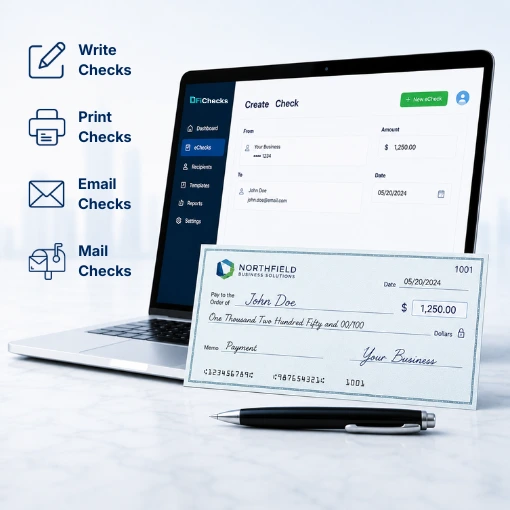
Write Checks
Print Checks
Email Checks
Mail Checks
LEARN THE CORRECT WAY TO WRITE A CHECK
Understand Every Part Before You Fill It Out
Writing a check requires more than entering an amount. Every section must be completed correctly to help ensure the payment can be processed without delays or errors.
No. 1
Enter the Date
Write the current date in the top right corner. This tells the recipient and the bank when the check was issued.
No. 2
Add the Payee
Write the full name of the person or business receiving the payment. If you’re wondering how to write a check to someone, always use the recipient’s legal or business name whenever possible.
No. 3
Write the Amount
Enter the payment amount in numbers and write the same amount in words. If you need to know how to write a check with cents, include the cents as a fraction over 100, such as 25/100.
No. 4
Sign the Check
Sign the check using the same signature registered with your bank. Unsigned checks cannot be processed.
HOW FICHECKS HELPS
Create and Send Checks in Just a Few Steps
FiChecks simplifies the entire process, whether you’re writing one check or managing business payments every day.

Create
Enter the payee, payment amount, memo, and other required details.

Review
Verify the payment information before sending or printing the check.

Send
Print the check, email it as a digital check, or have FiChecks mail it for you.

Track
Monitor payment status, delivery updates, and payment history from one dashboard.

Manage
Access previous checks, payment records, reports, and account activity whenever needed.
EVERYTHING YOU NEED TO WRITE AND SEND CHECKS
A Complete Check Writing Platform
Whether you need to pay employees, vendors, customers, or personal contacts, FiChecks provides multiple ways to complete the payment.
Write Checks Online
Create business or personal checks from any device with FiChecks and manage your check payments from one platform.
Digital Check Payments
Email secure digital checks that recipients can deposit electronically or print when needed.
Check Printing
Print professional checks using your existing printer and compatible check stock.
Check Mailing Services
Let FiChecks print, package, and mail checks directly to your recipients.
ACH Payments
Send and receive ACH payments for fast, secure bank-to-bank transfers without using paper checks.
Payment Tracking
View payment history, delivery status, and transaction records from a centralized dashboard.
WRITE CHECKS FOR PERSONAL OR BUSINESS PAYMENTS
One Platform for Everyday Check Payments
FiChecks supports a wide range of payment needs.
Pay employees and contractors
Pay vendors and suppliers
Send customer refunds
Make rent or utility payments
Issue reimbursement checks
Create one-time or recurring payments
Keep payment records organized
Flexible Check Writing for Every Payment
Whether you’re writing one check or managing hundreds, FiChecks gives you the tools to create, send, and track checks from a single platform.
Create and manage checks online
Multiple check delivery options
Centralized check tracking and records
Frequently Asked Questions
What is the correct way to write a check?
To write a check correctly, enter the date, write the recipient's name, fill in the payment amount in numbers and words, add a memo if needed, and sign the check. If you want an easier way to write out a check, FiChecks helps you create, print, email, and mail checks while keeping payment records organized.
How do you write cents on a check?
When learning how to write cents on a check, write the dollar amount in words and express the cents as a fraction over 100. For example, Twenty-five and 50/100. FiChecks automatically formats payment information to help reduce common writing mistakes when creating checks online.
Can I write and send checks online?
Yes. If you need to write a check online, FiChecks lets you create checks digitally, print them yourself, email them as digital checks, or have them mailed directly to the recipient from one platform.
Writing Checks by Hand vs Online Check Writing
Learning how to write a check properly is important, but manually filling out every check can become time consuming as payment volume grows. FiChecks lets you create checks online, print professional checks, email digital checks, mail checks, track payment status, and manage payment records from one dashboard. This helps simplify check payments while reducing repetitive manual work.