
QuickBooks ACH Payments
QuickBooks ACH Payments let businesses send and receive electronic bank transfers while keeping payment activity connected to their accounting workflow. FiChecks supports ACH payments for vendor bills, payroll-related disbursements, reimbursements, customer payments, and other business transactions, with payment records available for tracking and reconciliation.
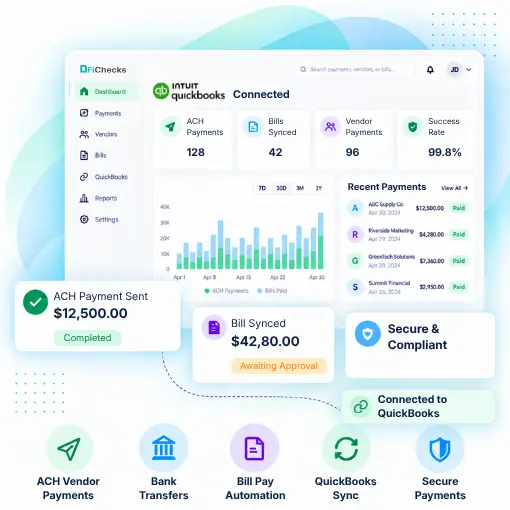
ACH Vendor Payments
Electronic Bill Payments
Automated Bank Transfers
QuickBooks Payment Sync
WHERE ACH PAYMENT WORKFLOWS GET COMPLICATED
Managing Bank Transfers Should Not Require Extra Steps
Businesses use QuickBooks to manage accounting, bills, vendors, and financial records. But moving money can still require separate payment tools, manual data entry, and additional tracking.
No. 1
Vendor payments take extra time
Paying vendors by bank transfer can involve entering payment details in separate systems and updating QuickBooks records manually.
No. 2
Payment records become difficult to track
When payments are processed outside your accounting workflow, teams may need to compare transactions across multiple platforms.
No. 3
Recurring payments require attention
Regular vendor bills and other scheduled payments can create repetitive payment tasks when there is no automated workflow.
No. 4
Accounts payable becomes disconnected
Moving between accounting software and separate payment platforms can make it harder to keep bills, transfers, and payment records aligned.
HOW FICHECKS WORKS
Send ACH Payments Without Leaving Your Accounting Workflow
FiChecks connects ACH payment processing with QuickBooks workflows so businesses can manage electronic bank transfers while keeping payment information organized.

Connect
Connect your QuickBooks account and set up your payment workflow.

Select
Choose a bill, vendor, recipient, or payment and enter the required details.

Approve
Review payment information and apply your internal approval controls before sending.

Send
Send ACH payments electronically to the selected recipient.

Track
Monitor payment status and access transaction records for easier reconciliation.
BUILT FOR EVERYDAY BUSINESS PAYMENTS
ACH Tools That Fit Into Your QuickBooks Workflow
QuickBooks ACH payments give businesses a practical way to manage electronic bank transfers for common accounting and payment needs.
QuickBooks ACH Vendor Payments
Pay vendors electronically without relying on paper checks for every transaction.
ACH Bill Payments
Send payments for approved bills and keep payment activity organized with your accounting workflow.
Recurring ACH Payments
Set up recurring payment schedules for regular business expenses and ongoing obligations.
Customer ACH Payments
Accept electronic bank payments from customers and manage transaction records in one workflow.
Business ACH Transfers
Move funds electronically for reimbursements, operating expenses, and other business transactions.
Payment Tracking
Monitor payment activity, transaction status, and payment records from a centralized platform.
MADE FOR QUICKBOOKS USERS
Manage Payments Across Your Business
QuickBooks ACH processing can support a wide range of business payment activities, including:
Pay vendors with ACH in QuickBooks
Process approved bills electronically
Send reimbursements through bank transfers
Manage recurring business payments
Handle customer ACH transactions
Track payment status and transaction history
Keep payment records organized for reconciliation
QuickBooks ACH Integration Without Unnecessary Complexity
Businesses often use QuickBooks for accounting while relying on separate tools to send payments. FiChecks brings ACH payment processing into the same workflow, making it easier to manage vendor payments, bills, transfers, and transaction records.
Connect payment activity with your QuickBooks workflow.
Reduce repetitive payment tasks with streamlined ACH workflows.
Manage electronic payments for approved bills and business expenses.
Frequently Asked Questions
What are QuickBooks ACH payments?
QuickBooks ACH payments are electronic bank transfers used to send or receive money through a QuickBooks-based payment workflow. FiChecks supports ACH payments for vendors, bills, reimbursements, customer transactions, and other business payments.
How can I send ACH payments from QuickBooks?
You can send ACH payments from QuickBooks by connecting your QuickBooks workflow with an ACH payment service and providing the required payment and recipient details. FiChecks provides tools for sending ACH transfers and tracking payment activity.
Can I pay vendors with ACH in QuickBooks?
Yes. Businesses can use ACH for vendor payments instead of relying only on checks or other payment methods. FiChecks supports QuickBooks ACH vendor payments and provides transaction tracking to help businesses manage outgoing payments.
QuickBooks ACH Payments vs Manual ACH Processing
Manual ACH processing often requires businesses to move between QuickBooks, banking platforms, and payment tools to enter payment details, send transfers, and update records. QuickBooks ACH payments connect electronic bank transfers with accounting workflows, making vendor payments, bill payments, and transaction tracking easier to manage. FiChecks supports ACH payment processing for QuickBooks while keeping payment activity organized and accessible.