
Salesforce Integration
Salesforce Integration connects customer and business workflows with payment operations through FiChecks. Businesses can manage customer payments, send vendor payments, process ACH transfers, create digital checks, print checks, and track payment activity while keeping payment operations organized and accessible.
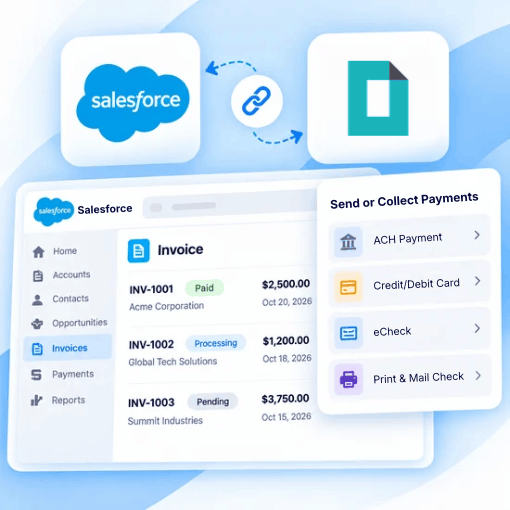
Secure Payment Workflows
ACH Transfer Support
Digital & Printed Checks
Payment Tracking & Reporting
WHERE PAYMENT WORKFLOWS FALL SHORT
Managing Payments Outside Salesforce Creates Unnecessary Work
Sales teams use Salesforce to manage customer relationships, sales activities, and business records. But when payments happen in separate systems, staff must switch between platforms, update records manually, and spend extra time checking payment status.
No. 1
Disconnected customer payment collection
When payment options sit outside Salesforce, teams may need to switch between tools to collect payments and update customer records. This makes it harder to keep payment information accurate and current.
No. 2
Manual vendor and supplier payments
Finance teams often handle vendor payments separately from their customer and account records. This creates extra work when preparing payments, collecting approvals, and tracking what has been paid.
No. 3
Limited payment visibility
Without a connected payment workflow, staff may need to check bank records, payment platforms, and spreadsheets to confirm whether funds have been received or sent.
No. 4
Repetitive administrative tasks
Manually preparing checks, managing ACH transfers, processing refunds, and updating payment records takes time away from customer service and other important work.
HOW FICHECKS WORKS
Connect Salesforce Workflows With Everyday Payment Operations
Salesforce integration with FiChecks gives teams a practical way to manage payment activities alongside their existing customer and business workflows. Teams can prepare payments, follow approval procedures, and track payment records without adding unnecessary steps.

Create
Prepare payment details, identify the recipient, and select an available payment method based on the transaction.

Approve
Use internal review procedures and user permissions to maintain control over payment preparation and authorization.

Process
Manage eligible payments through available methods, including ACH transfers, digital checks, printed checks, and check mailing.

Track
Review payment activity, delivery status, and transaction history to keep teams informed about outgoing and incoming funds.

Reconcile
Access payment records and reports to support reconciliation and reduce the time spent comparing information across separate systems.
EVERYTHING YOUR TEAM NEEDS
Payment Tools That Work Alongside Salesforce
FiChecks gives finance teams additional options for handling outgoing payments, reducing repetitive tasks, and managing payment records alongside their existing accounting processes.
Salesforce Customer Payment Collection
Manage eligible customer payments through available payment methods while keeping payment information organized for follow-up and recordkeeping.
Salesforce ACH Payments
Use ACH transfers for eligible vendor payments, refunds, reimbursements, and other business disbursements.
Salesforce eCheck Payments
Create and send digital checks electronically, reducing the need to print and mail a physical check for every payment.
Salesforce Check Printing Integration
Prepare professional business checks and print them using your existing printer and compatible check stock.
Salesforce Vendor Payment Automation
Manage vendor and supplier disbursements through a more organized workflow, with payment records available for tracking and review.
Salesforce Recurring Payments
Schedule recurring payments for ongoing obligations where supported by your payment workflow, helping reduce repetitive manual preparation.
BUILT FOR EVERYDAY BUSINESS OPERATIONS
Manage Customer Collections and Outgoing Payments in One Workflow
Salesforce integration supports businesses that need to connect customer information with practical payment processes. FiChecks provides payment tools for teams across sales, finance, operations, and administration.
Collect eligible customer payments and keep records organized
Pay vendors, suppliers, contractors, and service providers
Process refunds and reimbursements through supported methods
Send digital checks or print and mail physical checks
Manage ACH transfers for eligible business payments
Schedule recurring payments where supported
Review payment history and delivery status
Maintain accessible records for reporting and reconciliation
Keep Your Existing Systems While Improving Payment Workflows
Businesses already rely on Salesforce, accounting software, ERP platforms, and other tools to manage daily operations. Replacing these systems just to improve payment handling can introduce unnecessary costs and disruption.
FiChecks focuses on payment operations that complement your existing setup. Salesforce payment processing can be supported through an appropriate integration workflow, helping teams connect customer and payment activities without rebuilding their entire business process.
No new bank account required
Multiple payment methods available
Centralized payment records and reporting
Frequently Asked Questions
What is Salesforce integration for payment processing?
Salesforce integration for payment processing connects Salesforce-based business workflows with tools used to collect customer payments, pay vendors, and manage payment records. FiChecks provides ACH transfers, digital checks, check printing, check mailing, and related payment capabilities. The available workflow depends on the integration setup and supported features.
How can businesses accept and send payments through Salesforce?
Businesses can connect their Salesforce workflows with payment tools to manage eligible customer collections and outgoing payments. FiChecks supports payment methods such as ACH transfers, digital checks, printed checks, and mailed checks. Available options depend on the business requirements and integration configuration.
Can Salesforce integration automate recurring payments and vendor payments?
Salesforce integration can support recurring payment schedules and vendor payment workflows when the required features and connections are available. FiChecks allows businesses to manage eligible disbursements through supported payment methods, organize payment records, and reduce repetitive administrative work. The level of automation depends on the configured workflow.
Salesforce Payment Automation vs Traditional Payment Workflows
Traditional payment workflows often require staff to move between Salesforce, accounting software, banking platforms, and spreadsheets to collect funds, prepare payments, and update records. This can lead to duplicate data entry, delayed follow-ups, and limited visibility into payment status. Salesforce payment automation connects customer and business workflows with payment activities, reducing the need to manage every step separately. FiChecks supports this approach with ACH transfers, digital checks, check printing, check mailing, and payment tracking. The result is a more organized process for managing collections and disbursements while keeping existing business systems in place.