
Wave Integrations
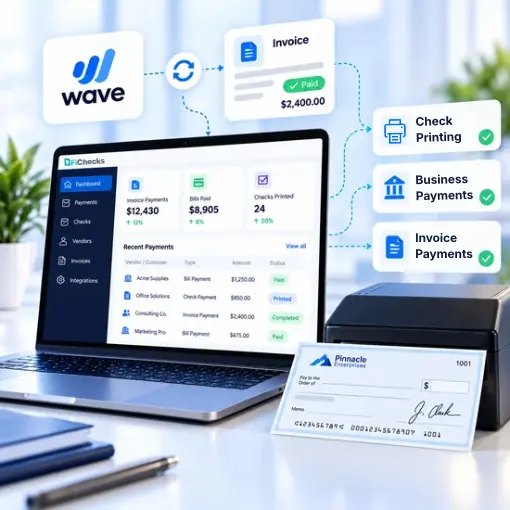
Wave Integrations connect accounting workflows with FiChecks for check printing, ACH payments, electronic checks, check mailing, and outgoing business payments. Instead of handling payment tasks separately after recording expenses or managing invoices, businesses can use FiChecks to prepare payments, deliver funds through supported methods, and keep payment records organized.
Secure Payment Processing
Business Check Printing
ACH & eCheck Payments
Web & Mobile Access
WHERE ACCOUNTING WORKFLOWS FALL SHORT
Recording Expenses Is Easy. Paying Them Takes More Work.
Wave Accounting helps businesses manage their books and invoices, but paying vendors, preparing checks, and handling outgoing payments can involve additional steps. When these tasks are handled separately, teams spend more time switching tools and updating records.
No. 1
Manual check preparation
Preparing checks for vendors, contractors, and other recipients can take time, especially when businesses handle multiple payments.
No. 2
Separate payment processes
Recording a bill in Wave does not eliminate the need to arrange its payment. Teams may still need separate tools to prepare and deliver funds.
No. 3
Time-consuming check delivery
Printing, packaging, and mailing checks individually adds work to routine accounts payable activities.
No. 4
Difficult payment tracking
When accounting records and payment activity are managed separately, confirming delivery and matching payments to expenses can require extra effort.
HOW FICHECKS WORKS
Manage Payments Alongside Your Wave Accounting Workflow
Wave integrations give businesses a practical way to manage outgoing payments through FiChecks while continuing to use Wave Accounting for their accounting tasks.

Create
Enter the payment details for a vendor, contractor, or other recipient, including the amount and relevant payment information.

Review
Check recipient details and payment information before proceeding. Apply available internal review procedures where needed.

Choose
Select a supported payment method, such as ACH, electronic checks, printed checks, or check mailing.

Deliver
Print checks using compatible check stock and your existing printer, send eChecks electronically, or arrange for FiChecks to print and mail checks.

Track
Review available payment records and activity to support bookkeeping, expense tracking, and reconciliation in your accounting workflow.
PAYMENT TOOLS FOR EVERYDAY ACCOUNTING TASKS
Wave Payment Processing Solutions for Growing Businesses
FiChecks supports common outgoing payment tasks for businesses that use Wave Accounting. Choose the tools that fit your existing processes without replacing your accounting software.
Wave Check Printing
Print business checks for vendors, contractors, rent, and other expenses using your existing printer and compatible check stock.
Electronic Check Payments
Send eChecks electronically instead of preparing and mailing physical checks for every payment.
ACH Payments
Use supported ACH transfers for eligible vendor payments, contractor payments, reimbursements, and other business expenses.
Check Mailing Services
Let FiChecks print, package, and mail checks on your behalf, reducing the time spent preparing and dispatching physical payments.
Vendor and Bill Payments
Manage payment preparation for outstanding bills and vendor expenses recorded in Wave. FiChecks handles supported payment workflows alongside your accounting process.
Payment Records and Reconciliation
Access available payment activity and records to help compare completed payments with the bills and expenses recorded in Wave Accounting.
BUILT FOR THE WAY BUSINESSES MANAGE MONEY
Handle Payments Across Your Day-to-Day Operations
Wave integrations are relevant to freelancers, small businesses, service providers, agencies, and growing companies that need a more practical way to handle outgoing payments.
Pay vendors for products, services, and operating expenses
Send payments to contractors and independent professionals
Prepare checks for rent, utilities, and recurring business costs
Print business checks without purchasing a check printer
Mail checks without managing every envelope yourself
Send payments through ACH and eCheck
Keep payment information available for reconciliation
Connect Payment Workflows Without Replacing Wave
Your accounting software already plays an important role in tracking income, expenses, and invoices. Changing your existing process just to handle outgoing payments can create unnecessary work.
FiChecks works alongside Wave Accounting to support payment preparation and delivery. Use Wave for your accounting activities and FiChecks for supported payment workflows.
Continue using your existing Wave Accounting setup
Choose from multiple payment methods
Reduce manual check preparation and mailing tasks
Access payment records to support bookkeeping
Frequently Asked Questions
What are Wave integrations for business payment processing?
Wave integrations connect Wave Accounting workflows with additional payment tools for handling business expenses and outgoing payments. FiChecks supports check printing, electronic checks, check mailing, and ACH payments alongside your existing accounting process.
How can I print and mail checks from Wave Accounting?
Businesses can use FiChecks to prepare checks for payments recorded in Wave Accounting. With Wave check printing workflows, you can print checks using your existing printer and compatible check stock or arrange for FiChecks to print, package, and mail them. Payment details should be reviewed against your Wave records.
Can I manage vendor payments and ACH transfers using Wave Accounting?
Wave Accounting helps businesses record bills and expenses, while FiChecks supports outgoing payment methods, including ACH transfers, printed checks, and electronic checks. You can use the available payment records to help reconcile completed payments with your accounting entries. Supported payment methods and workflows may vary.
Wave Accounting Payment Automation vs Manual Payment Workflows
Manual payment workflows often require businesses to move between accounting records, check preparation, mailing services, and payment tracking tools. Wave Accounting payment automation can reduce this administrative work by combining accounting workflows with dedicated payment tools. Wave integrations let businesses use FiChecks for check printing, check mailing, eChecks, and ACH payments alongside their existing accounting setup. Payment activity can then be reviewed against accounting records, helping reduce repetitive tasks and making reconciliation easier.